Linux
LiveOne script bootstraps Docker or Podman, waits for health, then hands you the lifecycle commands.
scripts/install.shRun it where you want — within reason.
Install targets, hardware tiers, and model lanes — with the most dangerous misconception corrected up front. Local-first means your backend and your data live on your machine. It does not mean the model runs on your hardware by default.
Nebula-COS is being prepared for one-script installs. Linux and Windows (via WSL2 / Docker Desktop) are the v1 targets; macOS is explicitly not. The installer bootstraps Docker or Podman, waits for health, and gives you lifecycle commands once release-gate evidence is complete.
One script bootstraps Docker or Podman, waits for health, then hands you the lifecycle commands.
scripts/install.shRuns via WSL2 / Docker Desktop. Same lifecycle, same health-gated install.
scripts/install.ps1Lifecycle commands: install, start, upgrade, doctor, logs, stop, uninstall.
macOS is explicitly not a v1 target.
Local-first means the backend and your data live on your machine — bound to 127.0.0.1, stored in SQLite you own, backed up redacted, with outbound requests restricted by an egress allowlist.
It does not mean the model runs on your hardware by default. Out of the box, chat calls a hosted OpenAI-compatible provider you choose (DeepSeek v4 is suggested in the setup wizard; OpenAI and any compatible endpoint work). Running models locally is an opt-in lane — a managed llama.cpp container, off by default, with no model bundled, and chat advertised disabled in the alpha.
The privacy story COS honestly tells is: your backend, your data, your allowlist — not on-device inference by default.
The read-only hardware planner detects a tier and recommends a profile. It recommends — it doesn't auto-provision.
The floor — runs the backend + hosted-provider chat fine.
Default install runs hereA little more headroom for the local-model and roadmap lanes.
Heavier lanes optionalA GPU opens up the opt-in local inference lane.
Heavier lanes optionalThe most capable detected tier for heavier local lanes.
Heavier lanes optionalDetected as its own tier for tier-aware recommendations.
Heavier lanes optional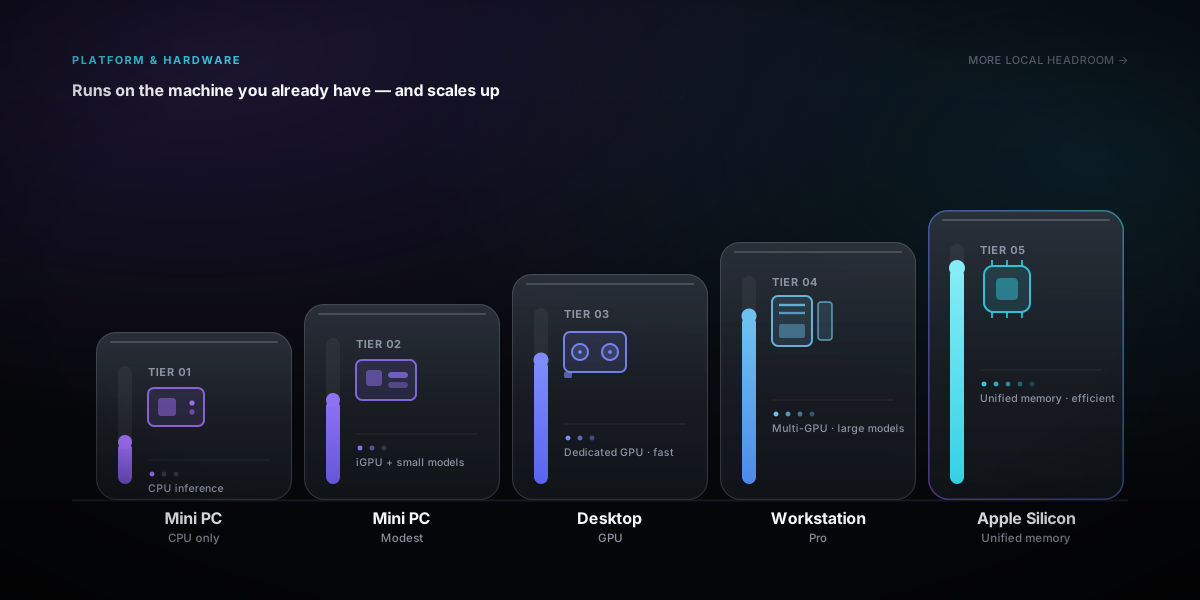
Five tiers from services/hardware.py. The planner is informational — it recommends, it doesn't auto-provision. Heavier lanes (local models, and the roadmap voice/memory stacks) are where tier matters; the default hosted-chat install is light.
There is no hardcoded provider in the backend — you supply it at setup. The DeepSeek default is a pre-filled wizard value, not a baked-in dependency.
A hosted OpenAI-compatible provider (DeepSeek v4 suggested in the wizard, user-supplied). The egress allowlist defaults to api.deepseek.com + api.openai.com.
user-supplied provider · egress allowlistA managed llama.cpp container — opt-in and off by default, with no model bundled.
managed llama.cpp container · no model bundledParakeet STT, Kokoro TTS over LiveKit — the target voice stack, scaffolded but idle in the alpha; not a running lane.
Parakeet STT · Kokoro TTS · LiveKitThere is no hardcoded provider in the backend — you supply it at setup; the DeepSeek default is a pre-filled wizard value, not a baked-in dependency.
Three honest deployment shapes. No "full local out of the box" claim — anywhere.
Default. Backend on your box, chat via your chosen API over the allowlist; lightest, works on the mini-PC tier.
Opt-in. Add the llama.cpp overlay to run inference on your own hardware; off by default, you bring the model.
Additional opt-in surfaces, each gated.
Nebula-COS is being prepared for one-script installs on Linux and Windows (WSL2 / Docker Desktop). macOS is not a v1 target. The public source release and clean install proof are still release-gated.